How to Block Porn on X and Reddit on iPhone
Many men set the iPhone's adult-website filter, feel good about it for a week, and then notice the real door was never Safari. It was X, or Reddit. Both carry adult content in the open, and the filter doesn't touch either app.
This guide is for the man doing this on his own phone. It explains why the gap exists, then gives three fixes in order of strength, with what each one costs you. We ran the Settings screens on iOS 26.5.
Why a website filter misses these two
Two separate reasons.
- The sites aren't on Apple's list. Limit Adult Websites works from a list of known adult sites. X and Reddit are general social sites, and an independent analysis in November 2026 found neither is blocked. So x.com and reddit.com open in Safari even with the filter on.
- The apps aren't websites at all. The filter checks web pages as a browser loads them. A feed inside an app is fetched by the app itself, so the filter never sees it. Blocking the address does nothing to the app.
So there are two doors per service: the website and the app. You have to close both.
Fix 1: block the websites
This closes X and Reddit in Safari. It takes two minutes.
- Open Settings › Screen Time › Content & Privacy Restrictions and make sure the switch at the top is on.
- Tap App Store, Media, Web, & Games, then Web Content.
- Make sure Limit Adult Websites is ticked. The Never Allow list only appears with it.
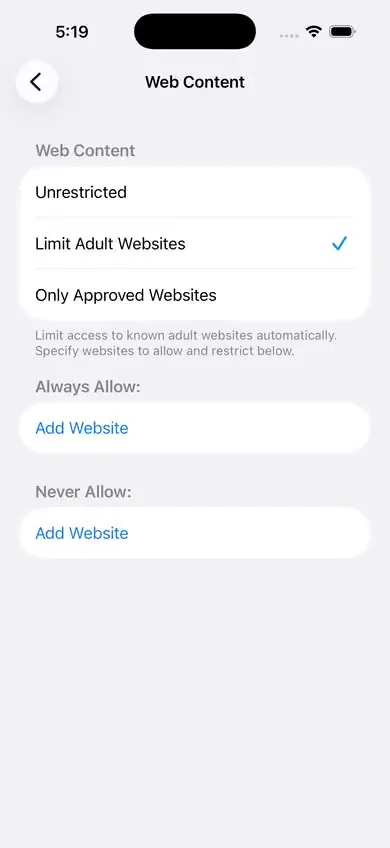
Never Allow shows up once Limit Adult Websites is ticked. - Under Never Allow, tap Add Website and add these, one at a time: x.com, twitter.com, reddit.com.
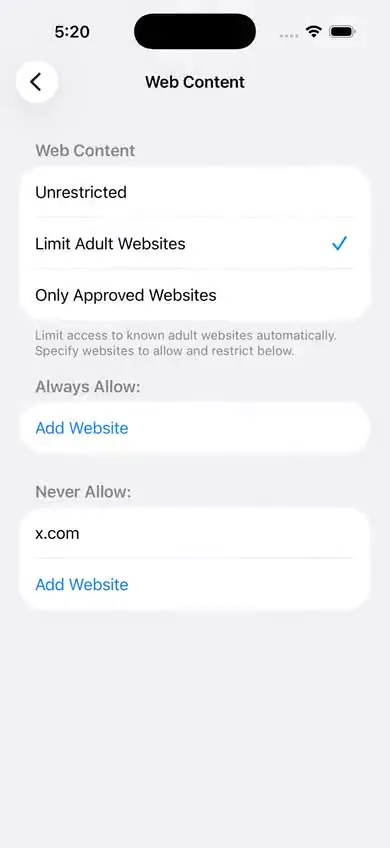
x.com is on the list. Add twitter.com and reddit.com the same way. - Test it: open Safari and type x.com. It should refuse to load.
If you've never set this filter up, the full walk-through is in how to block adult websites on iPhone.
Fix 2: remove the apps
With the websites blocked, the apps are the remaining door. The plain fix is to delete them from your Home Screen.
Before you do, be honest with yourself about what you use them for. If Reddit is where your hobby lives, or X is part of your work, deleting it has a real cost, and a fix you resent won't last. Two workable middle paths:
- Keep the service on a computer in a shared room, and off the phone that comes to bed with you.
- Delete one of the two. Most men know which one is the door.
Deleting is only as strong as the App Store, though. The app is one download away. Fix 3 is what makes it stick.
Fix 3: cap the age rating, so the apps can't come back
Screen Time can hide every app rated above an age you choose, and stop those apps being downloaded. Since iOS 26, App Store ratings run 4+, 9+, 13+, 16+ and 18+.
- Open Settings › Screen Time › Content & Privacy Restrictions › App Store, Media, Web, & Games.
- Tap Apps. On a phone with no limit, the row shows the highest rating.
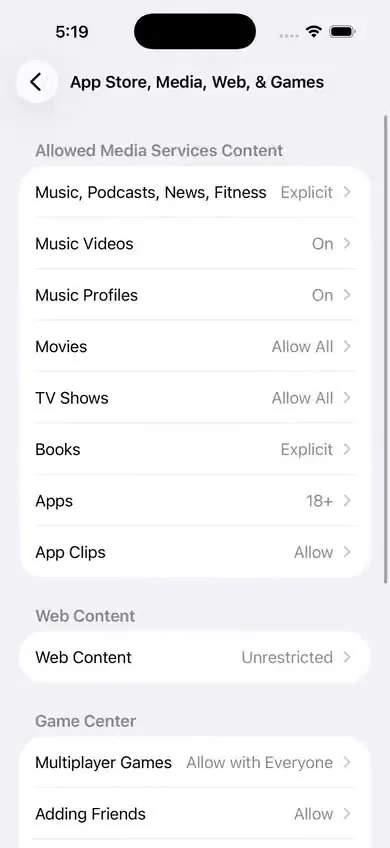
The Apps row, showing 18+ here, sets the highest app rating the phone allows. - Check the rating of X and of Reddit on their App Store pages (it's printed under the app's name). Then choose a rating below theirs.
- Go back to your Home Screen and look. Apps above the cap should be gone from view, and the App Store should refuse to download them.
What it costs: the cap is blunt. It hides every app above the rating, which can include other browsers and some apps you'd miss. Look at what disappeared before you lock anything. If the cost is too high, raise the cap one step and rely on Fix 2.
None of the three fixes holds unless Screen Time has a passcode, because without one you can undo all of it in a few taps. And a passcode you know is its own problem. See how to set a Screen Time passcode you can't use against yourself.
If you want the code held by someone else, with a wait you choose, that's what Sequoia does.
What about the settings inside X and Reddit?
Both services have an account setting that hides sensitive or mature content. Turn them off if you keep the apps. Two honest notes:
- We don't print the menu paths here. Both companies move these settings often, their help pages wouldn't load for us on the day we checked, and we won't hand you labels we haven't seen ourselves.
- These switches have no lock. Whatever you turn off in an app's settings, you can turn back on in ten seconds, with no passcode and no wait. Treat them as tidying, not as a lock.
What this can't do
- Someone else's passcode. If another person locked Screen Time on this phone, you can't change Web Content or the age cap without their code.
- Other apps. Telegram, Discord, Instagram, TikTok and Snapchat carried lower age ratings than X and Reddit when we checked Apple's public listing, so a cap that hides X and Reddit probably leaves them in place. If one of those is your door, it needs its own decision.
- Links opened inside apps. Some apps open links in their own small browser. One guide reports those aren't always filtered. We haven't tested it.
- A second device. Everything here is set on one iPhone. A laptop or an old phone is still open.
- The "Forgot Passcode" reset. If your Apple Account is attached to the Screen Time passcode, your own password resets it and brings both apps back.
- Search results. Image results in a search engine are a known soft spot. We haven't tested how iOS 26.5 handles them, so we make no claim.
Done together, the three fixes close the two doors most men describe. They don't seal the phone. It slows you down. It doesn't trap you.
How this guide was made
We ran the steps on iOS 26.5 in Apple's iOS Simulator, and every screenshot here is our own. Where we rely on Apple's pages or on someone else's report instead of our own test, the text says so. The draft was written with AI help and checked against the sources below. When Apple changes these screens, we update the page and the date at the top.
Sources
- Apple, iPhone User Guide for iOS 26: Block apps, app downloads, websites, and purchases
- Apple Developer: Updated age ratings in App Store Connect (24 July 2025)
- Helge Sverre: an analysis of Apple's adult website filter (4 November 2026, tested on macOS)
- Tech Lockdown: Screen Time not working (updated 20 April 2026)
- Tech Lockdown: iOS 26 Screen Time changes (updated 20 April 2026)
More guides
- How to block adult websites on iPhone (iOS 26)
The built-in filter, all eight taps, with a screenshot of each screen and a plain list of what it can't do.
- “Limit Adult Websites” not working? 7 causes and fixes
A one-minute test that tells you whether the filter is off or just has a gap, then the fix for each cause.
- How to set a Screen Time passcode you can't use against yourself
Four ways to keep the code out of your own head, and the truth about the Forgot Passcode reset.
- How to stop private browsing and new app installs on iPhone
What the filter really does to private tabs on iOS 26, and how to put the App Store behind a passcode.